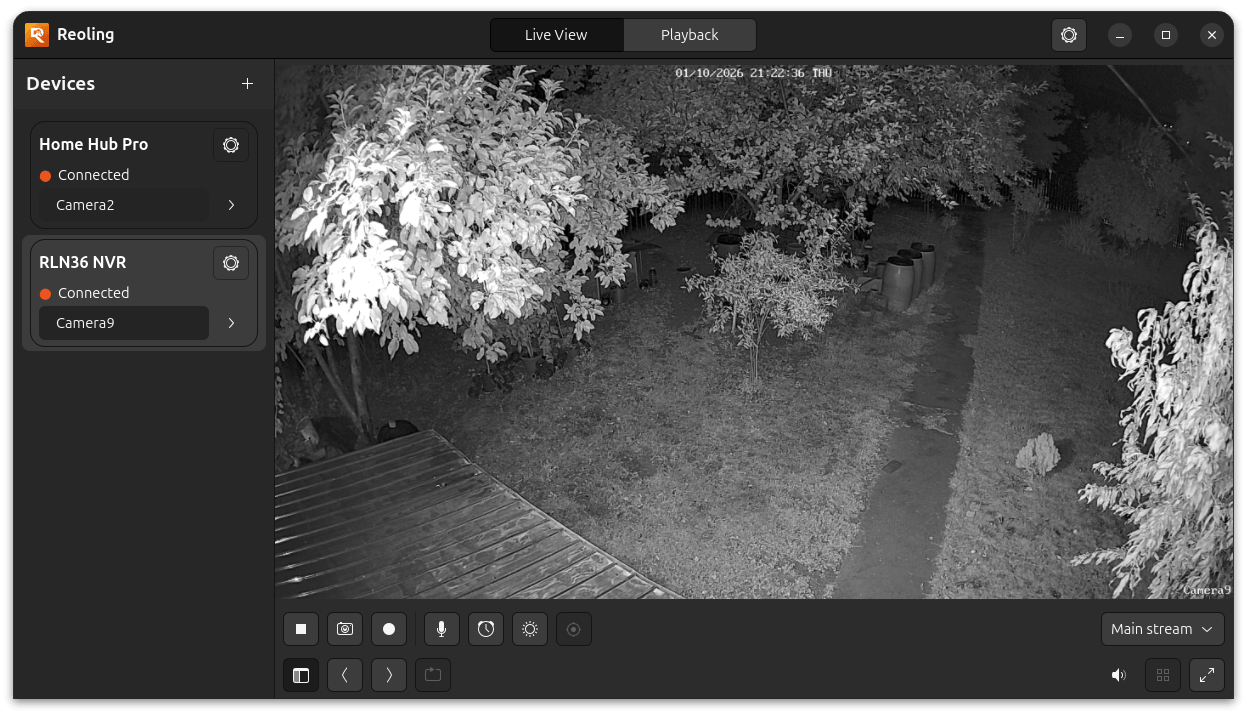
Live view, made native.
Choose a channel and stream, listen to its audio, or go fullscreen. GStreamer handles video with hardware or software decoding.
MAIN / EXTERN / SUB STREAMS Reolingfor LinuxView on GitHub
An unofficial, open-source Linux client for Reolink cameras, NVRs, and Home Hubs. View live streams, control your cameras, and save recordings locally. No cloud account required.
A desktop client that brings your devices,
live streams, playback, settings, and camera controls together.
Choose a channel and stream, listen to its audio, or go fullscreen. GStreamer handles video with hardware or software decoding.
MAIN / EXTERN / SUB STREAMSPan, tilt, zoom, and focus on supported cameras. Manage presets and your Monitor Point, or operate the spotlight and siren.
DEVICE-AWARE CONTROLSTake a PNG snapshot or record a stream to MKV. Choose where your captures live, right on your own Linux machine.
PNG SNAPSHOTS · MKV RECORDINGSAdjust live-view latency to suit your network.
A balance between quick reactions and smoother video. A useful starting point for everyday viewing.
Explore the app's settings. This website does not connect to your cameras.
Watch the recordings of each camera on your Home Hub or NVR, over the same P2P connection as live view, with sound at 1× and the camera's detections marked on the day timeline. Save any part of a day as an MP4 with its sound. Live view pauses while you watch and comes back as it was.
Every camera has a settings window, and so does the Home Hub or NVR itself. Both show the values the device reports, one tab per topic, and leave out the rows a model does not have. In 1.0.1 the pages are read-only, apart from the camera's Encoding tab.
Explore the live view, camera remote,
and client settings.
Your devices and camera streams together, with audio, snapshot, recording, and fullscreen controls.
No cloud account. No manual IP or port setup
when connecting by device UID.
Add your camera, NVR, or Home Hub using its UID. Direct IP entry is also available.
Local, NAT-mapped, and relay addresses are tried together. The first responding path is used.
Sign in with your device credentials. Saved passwords stay in your desktop keyring.
No Reolink cloud account required. UID discovery can use Reolink's P2P servers and a relay, depending on your network.
Reoling 1.0.1 comes as packages: a Debian package for Ubuntu and Debian, and an AppImage for other distributions, both for x86_64 Linux. Download one here, or build it from source.
Both are built on Ubuntu 24.04 by the release workflow and attached to every release on GitHub, with its release notes.
sudo apt install ./reoling_1.0.1-1_amd64.deb. apt installs the GTK 4 and GStreamer runtime with it, and Reoling appears in the applications menu.libfuse2 or libfuse2t64). Without FUSE, run it with --appimage-extract-and-run, or unpack it once with --appimage-extract. GTK 4, GStreamer, and the decoders are inside, and it follows your desktop's theme and accent colour. Where your system's GTK 4 and GStreamer are at least as new as its own (GTK 4.14, GStreamer 1.24), it runs on those instead, so a theme written for a newer GTK renders in full. The first time it runs, it gives its own file the Reoling icon in GNOME Files and, where the .deb is not installed, adds Reoling to the applications menu and the dock.# Get the source
git clone https://github.com/derSobi/Reoling.git
cd Reoling
# Build and launch
cargo build --release
cargo run --releaseYou'll need Rust 1.75 or newer, GTK4 4.6 or newer with its development headers, and GStreamer with the GTK4 paintable sink and a decoder plugin. The build guide lists the packages, and the scripts the release workflow runs build the .deb and the AppImage for you too.
Read the build guideVersion 1.0.1 comes as a .deb and an AppImage, built on Ubuntu 24.04 by the release workflow and available on GitHub. It follows 1.0.0, the first release with packages: the AppImage now runs on your system's GTK and GStreamer when they are new enough, Auto decoding prefers the integrated GPU, with a second Auto mode for a dedicated card, and a refused login keeps the saved password unless the device says the password is wrong. The project reports login, live video, the camera controls, the camera and device settings pages, and playback with sound, event bars, and downloads working on a real Home Hub, an NVR, and their cameras.
The camera and device settings pages are read-only: only Encoding can be changed. Playback shows one camera at a time, a device downloads one range at a time while its playback and live video wait, and several cameras or a whole day cannot be downloaded at once. The device list and the recordings show names and times, not thumbnails. Split View is not implemented, and zoom on cameras behind an NVR's sub-channel numbering is still pending. Some client settings are disabled in the app until they are supported.
No. Controls depend on the capabilities reported by each camera. PTZ, zoom, focus, siren, and spotlight appear where supported. Talk is implemented but is the least-tested feature.
No. Reoling is an independent, unofficial Linux client. It is not affiliated with, endorsed by, or sponsored by Reolink. Reolink is a trademark of its respective owner.
The GitHub README tracks the version history, current features, and known limitations, and GitHub Releases carries the packages and release notes. This page reflects the repository as reviewed on October 25, 2026.